Free Jeep Radio Code

Jeep radio anti-theft code from the unit’s own serial — Becker, Uconnect and Alpine radios in the Grand Cherokee, Wrangler and Liberty.

Own decoding algorithms
Free code — instant if you skip the wait
Expert support
Money-back promise
Family cars on the road
Free*
12345
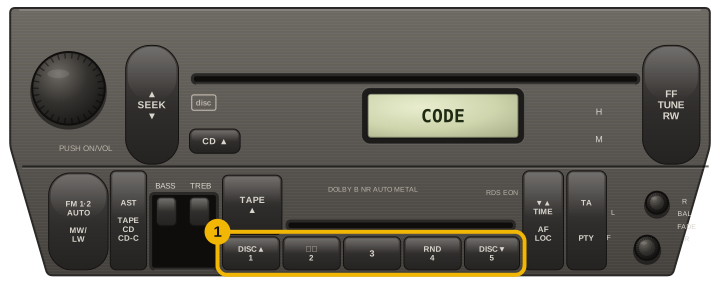
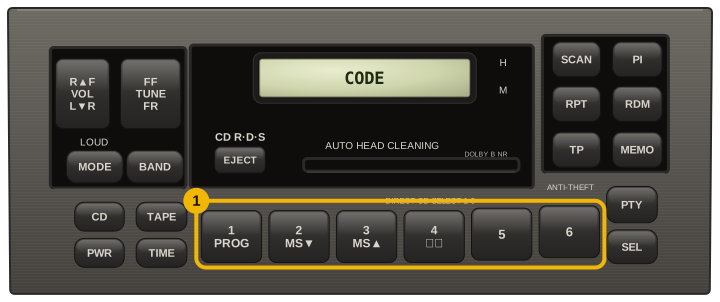
Count the numbered station buttons. The code is typed on them, so a five-button radio can only take a code made of the digits 1–5.
Only needed for a Continental label — it starts with A2C. The two generations build the code differently from the same number. If you are not sure, pick by the screen: the 5.0 is the wider touchscreen. Nothing is charged either way.
Only needed for a label that starts with TVPQN. We can work out the code for the Uconnect 5.0 — the radio with a 5-inch touchscreen. If yours is different, or you are not sure, say so: a wrong code locks the radio after a few tries.
A number starting with TZ is often printed on the screen part, not on the radio. The code belongs to the radio unit behind the dash.
Please enter a serial from the casing label like T0MYD304821657 or TH1AA2874Y5314. The model or part number printed on the case is a different number.
Code delivery time: free for T0MYD, T00BE, TM9 and TQ/TC/TH labels — 24 hours, or instantly if you pay
The serial from the casing label — a 14-character T0MYD…, T00BE…, TQ/TC… or TH…, a 12-character TM9… off a Uconnect unit, or an A2C… Continental label.

How to Find your Jeep Radio Code

For a Jeep radio code we need the serial printed on the unit itself. We answer the 14-character T0MYD… and T00BE…, the older TQ/TC… and TH…, and the 12-character TM9… found on Panasonic-built Uconnect units.

An A2C… Continental label works for Uconnect 3.0 and 5.0 — choose your unit in the list under the form. T00AM… we cannot decode yet, and the page says so before you leave any details.

Reading the label means taking the radio out of the dash: a prying tool lifts the plastic trim, and four screws behind it hold the unit.

Asking for the code “by VIN”? A dealer can sometimes find it in the factory record of the radio your car was built with. We go by the serial printed on the unit, so a radio swapped in from another car still gets its own, correct code.

Casing label (T…)

Starts with T — copy all of it:

T0MYD304821657

Models and Makes Covered

How to Enter your Jeep Radio Code

  1. Switch the ignition to RUN and the radio on, and wait for CODE. If a touchscreen says Radio Locked, Please Start Vehicle, start the engine — that is not a code request.
  2. Alpine units (label TQ… or TC…): press the preset whose number is each digit, once — for 5452 press 5, 4, 5, 2. These codes use only the digits 1–5 (five presets) or 1–6 (six presets). There is no confirm button: the radio starts after the fourth digit.
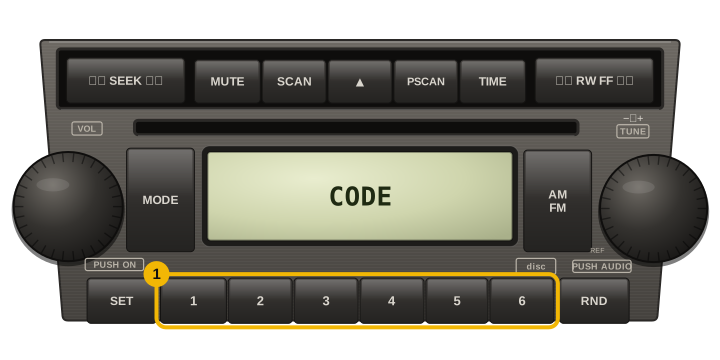
  3. Other preset radios: press the preset buttons that match the digits, in order. If the radio does not start after the last digit, tell us what the display shows rather than trying other keys.
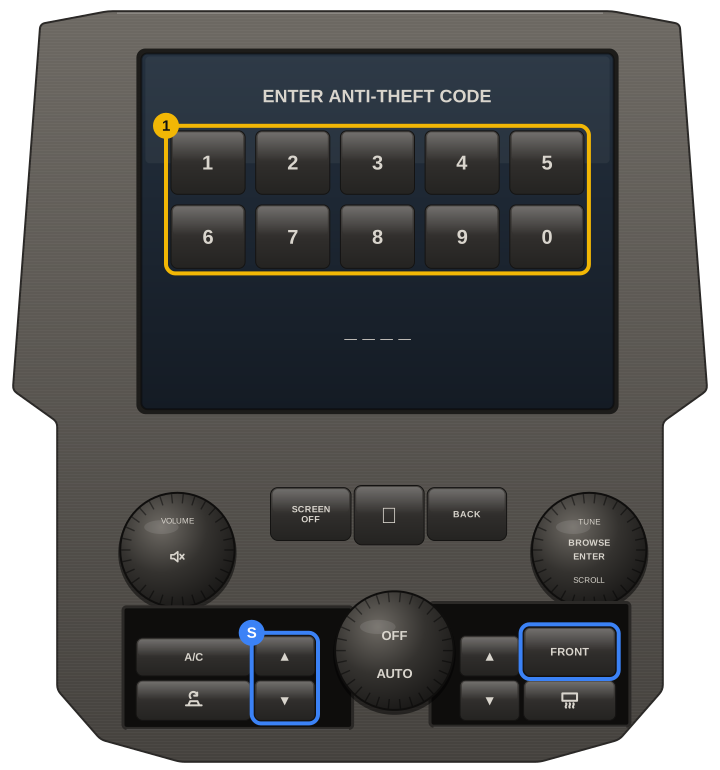
  4. Uconnect touchscreens: type the four digits on the screen and press the confirm key if one appears.
  5. After three wrong codes the radio shows WAIT: leave the ignition in RUN and the radio on for 30 minutes without a break (older Alpine units up to two hours). The 4-digit DATE CODE on the label is not your radio code.
Chrysler / Jeep Alpine radio with five presets: press preset 1 to 5 once for each digit, the radio starts after the fourth digit
Chrysler / Jeep radio with six presets: press preset 1 to 6 once for each digit, the radio starts after the fourth digit
Mopar preset radio (RES / REQ type): with CODE on the display, press the preset buttons 1 to 6 that match the digits, in order
Uconnect 8.4 touchscreen: type the four digits on the on-screen keypad; the dealer-mode buttons on the climate panel can show the radio serial

Our Reviews

9
Verified unlocks confirmed by owners

Every card here is a code an owner told us worked, tied to an order we can check. Codes that did not work are not shown here, and a fee paid to skip the wait comes back automatically.

Read them all

Jeep✓ Verified unlock

Code confirmed by the owner

28 October 2026

Jeep✓ Verified unlock

Code confirmed by the owner

26 October 2026

Jeep✓ Verified unlock

Code confirmed by the owner

25 October 2026

Jeep✓ Verified unlock

Code confirmed by the owner

22 October 2026

Jeep✓ Verified unlock

Code confirmed by the owner

4 October 2026

Jeep✓ Verified unlock

Code confirmed by the owner

3 October 2026