Free Volkswagen Radio Code

Volkswagen radios unlocked online — we look your unit's serial number up in our database of VW and other VAG codes.

Own decoding algorithms
Free code — instant if you skip the wait
Expert support
Money-back promise
Family cars on the road
Free*
Please enter a serial like VWZ172L0338338 — it starts with VWZ, AUZ, SKZ or SEZ. A part number (1P1 035 186 B) or a Blaupunkt product number (7 646 546 366) names the model, not your unit, so no code follows from it.
Code delivery time: free — emailed in 24 hours, or instantly if you pay
The serial is printed on the unit's own label and starts with VWZ — 14 characters, e.g. VWZ172L0338338.

How to Find your Volkswagen Radio Code

The radio itself never shows the serial: when a Volkswagen unit loses power it just asks for SAFE. The number we need is on the label on the casing, so the unit has to come out of the dash.

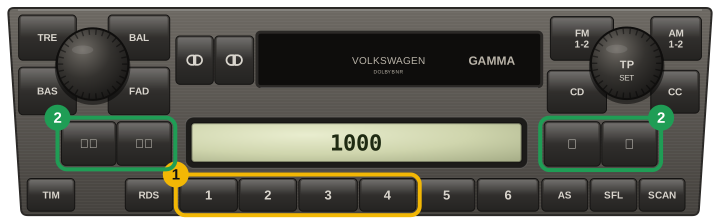
Older Gamma units come out with a pair of U-shaped release keys; double-DIN RCD and RNS units take four flat T-keys, two per side.

Nothing needs unplugging — pull the unit forward far enough to read the top and side labels.

On the label, look for a 14-character string starting with VWZ — for example VWZ172L0338338.

Two numbers on the same label will not work, and people send them every day. The part number (1P1 035 186 B, 1K0 035 186 — three characters, then two groups of three digits, sometimes a letter) names the model of radio. The Blaupunkt product number (7 646 546 366 — ten digits starting with 7) names who built it. Both are identical on thousands of cars, so no code can follow from either. Only the VWZ string is yours.

Straight answer about VW-group codes: there is no formula. The code lives in the radio's own memory chip, so every service that answers by serial — ours included — is reading a collected database. Most units are answered on the spot; when a serial is not in ours we say so straight away, and you are charged nothing for a code we cannot deliver.

Volkswagen unit label

The serial is on the label on the top or side of the casing:

VWZ172L0338338

Not the part number not this one

Neither the part number nor the Blaupunkt product number beside it can produce a code — both are the same on every unit of that model:

7 646 546 366

SAFE on the display screen

A locked unit shows SAFE. After a few wrong tries it waits an hour before it will accept anything — so check the code with us before guessing.

Models and Makes Covered

How to Enter your Volkswagen Radio Code

  1. Switch on the ignition and the radio. Most units show SAFE, then 1000 by themselves after a few seconds.
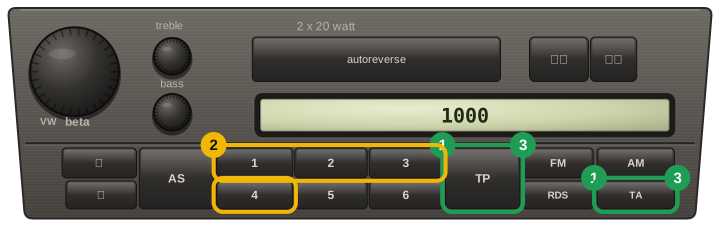
  2. Older units that stay on SAFE (Gamma and Beta with separate TP and TA keys, Audi Concert, Chorus, Symphony): hold the pair of keys printed for it — TP + TA, FM1 + AM, AS + RDS — until 1000 appears, then let go and don’t press the pair again yet.
  3. Presets 1–4 each set one digit: press button 1 until the first digit is right, then 2, 3 and 4.
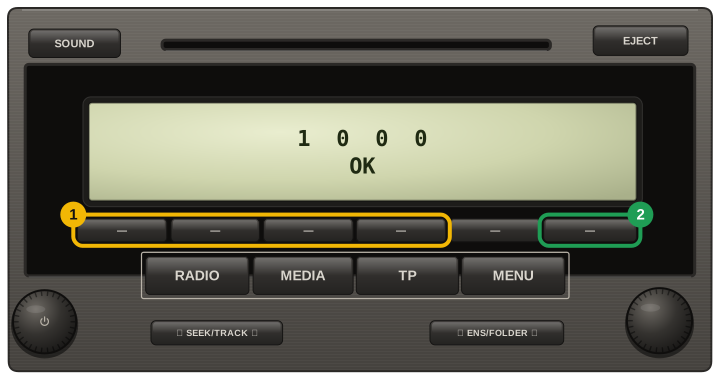
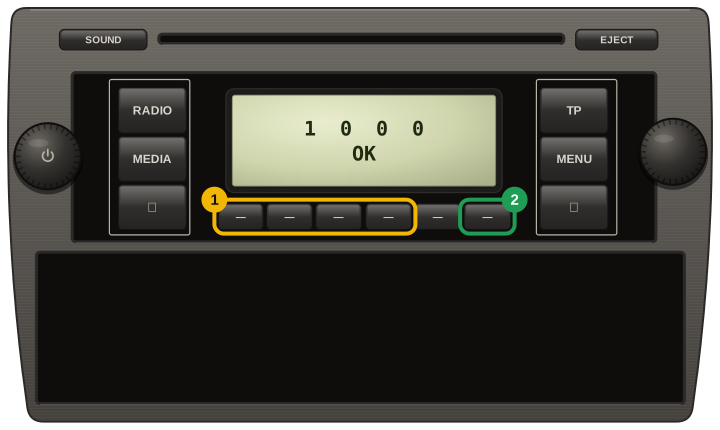
  4. To confirm: older units with the key pair — hold the same pair until SAFE shows again; red-lit Gamma / Beta (Golf IV era) — hold the cassette key or the seek key for more than 2 seconds; RCD 210 / 310 — the button under OK on the display; RCD 300 — the button beside ENTER; Seat Aura — hold PTY until it beeps; Seat Alana — hold SCAN until it beeps; Škoda Swing — press key 6; Škoda Blues — hold key 6.
  5. Touchscreens (RCD 510, RNS 315 / 510, Bolero): type the code on the keypad and tap the confirm field.
  6. You get two tries, then the unit locks for about an hour: keep the ignition and the radio on for the whole hour.
  7. SAFE in the car the radio came from, after a battery change, means it has lost its link to the instrument cluster — tell us before entering anything.
VW Gamma / Beta with red lighting (Golf IV era, 1998-2003): SAFE turns into 1000 by itself after about 3 seconds, presets 1 to 4 step the digits, then hold the cassette fast-forward rocker or the seek rocker for more than 2 seconds to confirm
VW Beta / Gamma cassette radio with TP and TA keys: hold TP and TA together until 1000 shows, step the digits with presets 1 to 4, then hold TP and TA again until SAFE shows to confirm
VW RCD 310: after SAFE the display shows 1000, the first four keys under the display step the four digits, and once OK appears the key under it (the sixth, as on the Skoda Swing) confirms
VW RCD 210: after SAFE the display shows 1000, the first four keys under the display step the four digits, and the sixth key (under OK on the display) confirms; on the Skoda twin (Blues) it is a long press

Our Reviews

3
Verified unlocks confirmed by owners

Every card here is a code an owner told us worked, tied to an order we can check. Codes that did not work are not shown here, and a fee paid to skip the wait comes back automatically.

Read them all

Volkswagen✓ Verified unlock

Code confirmed by the owner

26 October 2026

Volkswagen✓ Verified unlock

Code confirmed by the owner

24 October 2026

Volkswagen✓ Verified unlock

Code confirmed by the owner

12 October 2026