Free Alfa Romeo Radio Code

Alfa Romeo radios unlocked online — from the serial on the unit’s own label.

Own decoding algorithms
Free code — instant if you skip the wait
Expert support
Money-back promise
Family cars on the road
Free*
Please enter a serial like AR570WA8161831, BP237534082298, A2C99…, a 13-digit Bosch number or a DAIICHI S2599.
Estimated code delivery time: free — BP… label in 24 hours or instantly if you pay; AR… instantly for a share
Serials come from the label on the casing: Alfa’s own (AR…), Blaupunkt (BP…), Continental (A2C…) or DAIICHI (a letter and four digits).

How to Find your Alfa Romeo Radio Code

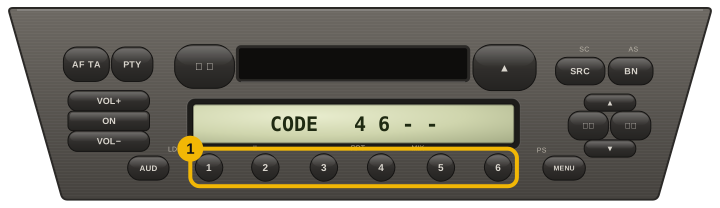
Alfa radios lock themselves the moment they lose power — after a flat battery, a jump start or an alternator change — and come back asking for CODE.

The number we need is not on the screen: it is printed on the label on the unit’s casing, so the radio has to come forward out of the dash. A pair of release keys pushed into the four corner slots is all it takes.

On the label look for the serial — the prefix tells you who built the unit: AR Alfa’s own, BP Blaupunkt, A2C Continental.

Alfa and Fiat share the same suppliers, so a Blaupunkt BP… label here is the same family we already answer on Fiat — and the one Alfa format with codes confirmed on real cars.

A short serial is still a serial: DAIICHI units carry just one letter and four digits, like S2599. Copy the letter too — four bare digits could belong to three different units, and we would rather ask than guess.

Older Bosch units print a plain number instead: thirteen digits starting with 0 and ending with 00. That is the same family Lancia and Iveco use, and it works here as it does there.

Alfa unit label

Serial number example:

AR570WA8161831

Alfa Blaupunkt instant

Serial number example:

BP237534082298

Alfa Continental

Serial number example:

A2C9915190300043272

Models and Makes Covered

147 156 159 GT Giulietta MiTo Brera Spider 166 GTV 145 Giulia

How to Enter your Alfa Romeo Radio Code

  1. Turn the radio on — “CODE” appears on the display.
  2. Preset buttons 1–4 set the digits: press each until its digit is right, cycling past 9 back to 0.
  3. Confirm by holding the rightmost preset, or press OK on units that have one.