Free Opel Radio Code

Opel radios unlocked online — from the serial on the label of the unit.

Own decoding algorithms
Free code — instant if you skip the wait
Expert support
Money-back promise
Family cars on the road
Free*
Please enter the unit serial from the casing label, like GM150010000003, or the letter A and four digits on a Famar-built unit.
Code delivery time: free — emailed in 24 hours, or instantly if you pay
Serial from the unit label (GM1500… / GM0205… / PH…) or a reference number like A0000 on a Famar-built unit. A VIN alone does not give the code.

How to Find your Opel Radio Code

Start with the serial on the unit. That is what we answer: the label on the casing carries it, and it names your exact radio rather than the car around it.

The form still accepts the 17-character VIN, but VIN lookups are not something we can answer at the moment: you will get a plain "not found" and no charge. The serial on the unit is the one that works.

The certain way — the unit serial. Pull the radio out with a pair of release keys and read the label on the casing: GM1500… on a CDR 500, GM0205… on a CDR 2005, 14 characters in total. On the older Famar-built players — CDP 2500, CDP 2700, DC401 and their kin — the label instead carries a short reference number: the letter A and four digits. Send that whole, letter included.

A serial names your exact unit rather than the car around it, which is why it is the one we work from. If in doubt, pull the serial.

Delco unit label instant

The serial is on the label on the casing:

GM150010000003

CDR 2005 label instant

Later units carry the same kind of label, starting GM0205:

GM020510000003

Models and Makes Covered

How to Enter your Opel Radio Code

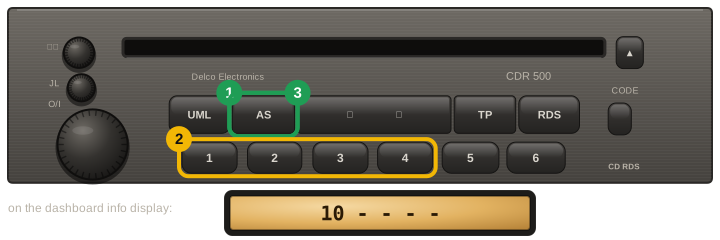
  1. CDR 500, CDR 2005 and CAR 300 units: with the ignition on and the radio off, hold AS and switch the radio on. SAFE appears, then a number and four dashes — the number is the tries left.
  2. Presets 1–4 each set one digit: press each until its digit is right. Check after the first press — some units start from blank.
  3. Hold AS until the radio beeps. SAFE again after the beep means the code was not accepted.
  4. CD30, CD40, CD70 and DVD90 units (Astra H, Zafira B, Corsa D, Vectra C) are usually paired to the car by a dealer tool rather than unlocked with a code: if yours shows LOCKED or SAFE, tell us before ordering.
Opel / Vauxhall CDR 500 (Delco / VDO): hold AS while switching the radio on, step the digits with presets 1 to 4, then hold AS until it beeps; the code shows on the dashboard info display

Our Reviews

4
Verified unlocks confirmed by owners

Every card here is a code an owner told us worked, tied to an order we can check. Codes that did not work are not shown here, and a fee paid to skip the wait comes back automatically.

Read them all

Opel✓ Verified unlock

Code confirmed by the owner

18 October 2026

Opel✓ Verified unlock

Code confirmed by the owner

16 October 2026

Opel✓ Verified unlock

Code confirmed by the owner

9 October 2026

Opel✓ Verified unlock

Code confirmed by the owner

9 October 2026