Free Dacia Radio Code

Dacia radios use the same security precodes as Renault — we calculate your original code online, free.

Own decoding algorithms
Free code — instant if you skip the wait
Expert support
Money-back promise
Family cars on the road
Free*
Please enter a precode like R185, or a Delphi label like 89FJ….
Code delivery time: free — emailed after 24 hours, or instantly if you skip the wait
The precode — 1 letter + 3 digits — is printed on the radio’s rear sticker. A Delphi label starting 89… works too.

How to Find your Dacia Radio Code

Dacia fits Renault head units, so a Dacia radio is answered the same way: from its four-character precode, one letter and three digits such as Z527. A Delphi label starting 89 works as well.

The precode is on the sticker at the back of the radio, usually beside the word “security”. Ease the unit forward out of the dash with release keys to read it; nothing needs unplugging.

Precode on the sticker

Same place as on a Renault unit: the sticker at the back.

Z527

Models and Makes Covered

How to Enter your Dacia Radio Code

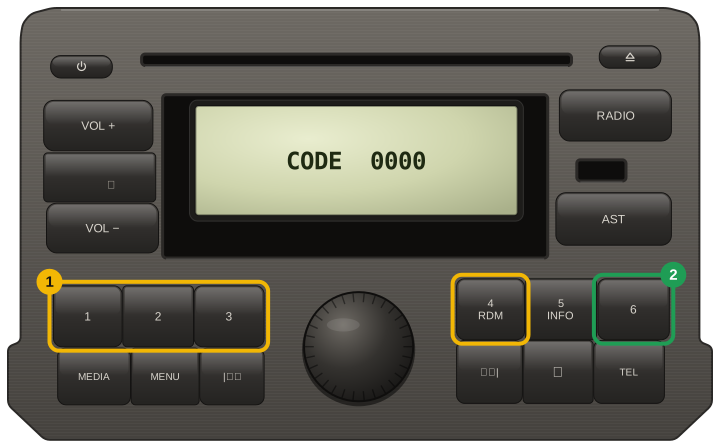
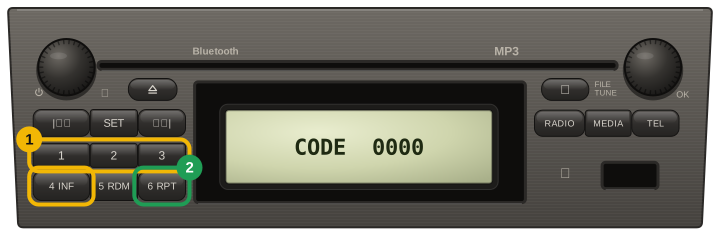
  1. Presets 1 to 4 each own one position of the code — button 1 sets the first digit, button 4 the last.
  2. Every tap steps that digit up by one, so keep tapping until it matches your code.
  3. With all four digits showing, hold button 6 until the radio beeps — a short press does not count.
  4. If holding 6 does nothing, hold 5 until it beeps, then hold 6 until it beeps.
  5. Units with no buttons of their own (the code shows on the dashboard display): turn the thumbwheel behind the steering wheel to set each digit, press the end button of the stalk to move on, and hold it after the fourth digit until the beep.
  6. After a wrong code the radio waits, longer each time: leave it switched on until CODE returns.
Dacia / Renault radio with the 1-2-3 and 4-5-6 key blocks (Logan II, Sandero II, Duster, Dokker): each tap of presets 1 to 4 steps its digit, then press and hold 6
Renault / Dacia single-DIN radio with a 2 x 3 keypad (second panel of the same handbook): each tap of presets 1 to 4 steps its digit, then press and hold 6

Our Reviews

2
Verified unlocks confirmed by owners

Every card here is a code an owner told us worked, tied to an order we can check. Codes that did not work are not shown here, and a fee paid to skip the wait comes back automatically.

Read them all

Dacia✓ Verified unlock

Code confirmed by the owner

23 October 2026

Dacia✓ Verified unlock

Code confirmed by the owner

17 October 2026