Free Kia Radio Code

Kia radios unlocked online — Kia and Hyundai share the same head units, so the same tables answer them.

Own decoding algorithms
Free code — instant if you skip the wait
Expert support
Money-back promise
Family cars on the road
Free*
The two families build the code differently from the same digits. If you are not sure, pick either and we will check it before sending — nothing is charged for a code that does not fit.
Please enter the serial from the label on the radio, for example BS0723050041668 — not the part number (those have letters mixed in among the digits, like A2C53354153 or 961401G000).
Estimated code delivery time: free and instant once you pick the unit — a share unlocks it
The serial from the label on the radio — letters first, then a long run of digits. Not the part number.

How to Find your Kia Radio Code

Kia and Hyundai are the same group and share head units, so a Kia radio is read exactly like a Hyundai one: the serial is on the label on the casing, and the unit has to come out of the dash to see it.

Copy the serial exactly as printed and send it as it is.

The label carries more than one number. The serial is the one that starts with letters and then runs digits all the way to the end, like BS0723050041668. Numbers with letters sitting inside the digits — A2C53354153, 961401G000 — are part numbers, and no code can be worked out from them, so we do not accept them.

Why we ask which unit you have. Two families build their code differently from the same four digits, and the serial alone does not say which. That one question in the form is the difference between a right answer and a coin toss. Picked the wrong one? Tell us and we will send the other.

No owner has confirmed this rule to us yet, so the code is free: a share unlocks it, and we ask you afterwards whether it fitted. Not sure which number is the serial? Email us a photo of the label.

Kia label

The serial is on the casing label — copy it exactly as printed.

BS0723050041668

Models and Makes Covered

Ceed Rio Sportage Picanto Sorento Venga Soul Carens Cerato Magentis

How to Enter your Kia Radio Code

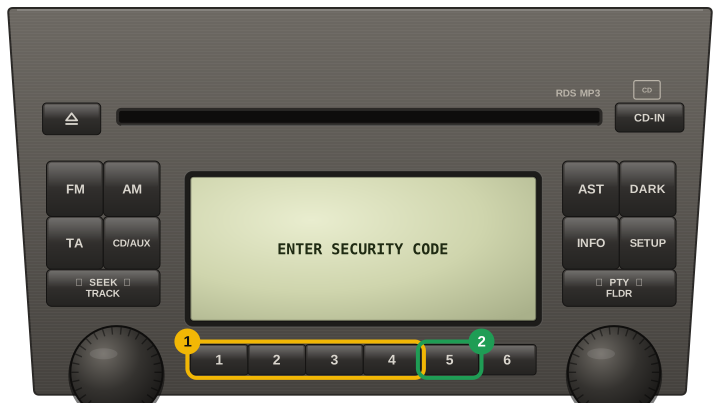
  1. Switch on the radio — the display asks for the code.
  2. On button units the preset buttons 1–4 each set one digit; on newer units the code is typed directly.
  3. Confirm with OK or by holding the last preset button.