Free Toyota Radio Code

Toyota and Lexus units unlocked online — free from the 16-character ERC number the screen shows, instantly if you would rather not wait.

Own decoding algorithms
Free code — instant if you skip the wait
Expert support
Money-back promise
Family cars on the road
Free*
Please enter the 16-character ERC number from the screen (e.g. 10184525289BA354) or the serial from the casing label.
Estimated code delivery time: free for an ERC number — 24 hours, or instantly if you pay
The 16-character ERC number from the screen, or the serial from the casing label.

How to Find your Toyota Radio Code

The quick way — the ERC number. Japanese-built navigation and audio units show it themselves, so nothing has to come out of the dash: press and hold the main button on the unit, switch the parking lights on and off three or four times, then press the one button that lights up on screen.

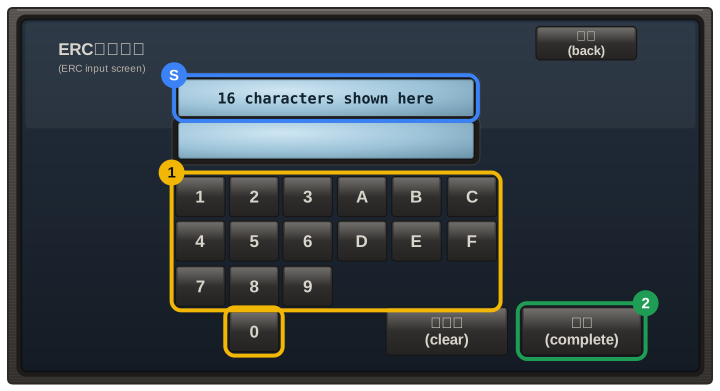
The screen then shows a 16-character number made of digits and the letters A–F, for example 10184525289BA354. Type it in exactly — that is all we need.

Older units. If your radio never shows an ERC number, the serial is on the label on the casing and the unit has to come forward out of the dash — most are held by four screws behind the trim panels. That format we cannot work out yet, and we would rather say so than guess; send it over anyway and we will tell you the moment it is covered.

Not sure which number is the serial? Email us a photo of the label and we will pick it out for you.

ERC on the screen instant

16 characters, digits and A–F. Nothing to remove from the dash:

10184525289BA354

Toyota label not yet

Older units: the serial is on the casing label — copy it exactly as printed.

Models and Makes Covered

Prius Alphard Estima Land Cruiser Prado Auris Avensis Aygo Corolla Hilux RAV4 Yaris

How to Enter your Toyota Radio Code

  1. An ERC code is 8 characters and is typed on the touchscreen with the keys A–F and 1–9, then confirmed.
  2. On older button units the preset buttons 1–4 set the digits, and newer touchscreens ask for the code directly.
  3. Your code email includes the exact steps for your unit.