Free Dacia Duster Radio Code

Every Dacia Duster from 2010 to 2017: which radio was fitted, where its serial number hides, and what we can do with it.

Your code comes from the serial number of the radio, not from the car — so the first job is getting that number off the unit. The table below is your Duster: the units fitted, and where the serial hides on each.

Already have the serial? Type it in and we will tell you straight away whether we can answer it.

All Dacia radio codes →

Free*
That does not look like a Dacia serial — check the table below for where to find it.
We never ask for the code you are missing — only the serial.

Which radio is in your Duster?

GenerationRadios fittedSerial Where to read itWhat we do
I
2010–2017
Renault Tuner List, CD Player letter + 3 digits the precode (for example R185) is printed on the label on the rear casing, usually next to the word Security Free in 24 h, or instant if you pay

Radio names are what is written on the fascia, not the name of the company that built the unit — a “6000 CD” or an “RCD 300” is what you see in the car. Unit fitment varies by market and trim, so treat the list as the usual case and let the serial decide: it is the serial that determines the code, not the model.

Dacia Duster radio code by year

From 2010 to 2017 the Duster came with the radios below; the serial on the unit is what decides the code.

Dacia Duster radio code (2010–2017)

On Duster cars from 2010–2017 the radio fitted was usually one of: Renault Tuner List, CD Player. The serial reads letter + 3 digits; the precode (for example R185) is printed on the label on the rear casing, usually next to the word Security. Send us that serial: the code is free by email within 24 hours, or on the page straight away if you pay to skip the wait.

How to enter the code in your Duster

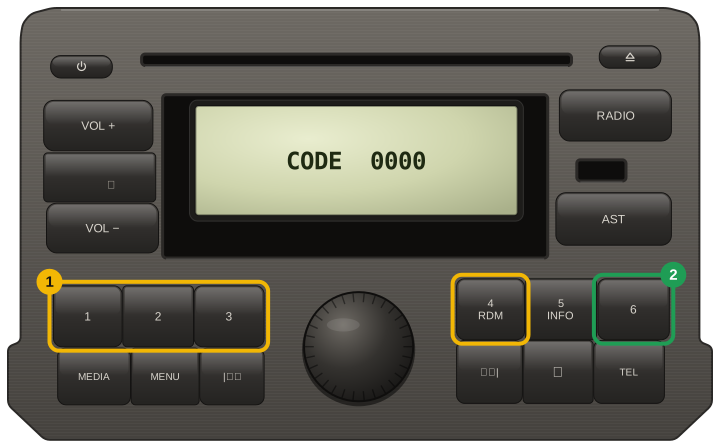
  1. Presets 1 to 4 each own one position of the code — button 1 sets the first digit, button 4 the last.
  2. Every tap steps that digit up by one, so keep tapping until it matches your code.
  3. With all four digits showing, hold button 6 until the radio beeps — a short press does not count.
  4. If holding 6 does nothing, hold 5 until it beeps, then hold 6 until it beeps.
  5. Units with no buttons of their own (the code shows on the dashboard display): turn the thumbwheel behind the steering wheel to set each digit, press the end button of the stalk to move on, and hold it after the fourth digit until the beep.
  6. After a wrong code the radio waits, longer each time: leave it switched on until CODE returns.
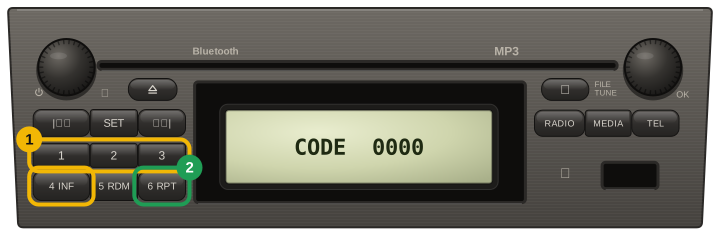
Renault / Dacia single-DIN radio with a 2 x 3 keypad (second panel of the same handbook): each tap of presets 1 to 4 steps its digit, then press and hold 6
Dacia / Renault radio with the 1-2-3 and 4-5-6 key blocks (Logan II, Sandero II, Duster, Dokker): each tap of presets 1 to 4 steps its digit, then press and hold 6

Careful: most units lock for good after about ten wrong attempts. If a code does not take, stop and email us before trying again.

Other Dacia models

Dacia Duster radio code: questions

Where is the serial number on a Dacia Duster radio?

I (2010–2017): letter + 3 digits, the precode (for example R185) is printed on the label on the rear casing, usually next to the word Security.

Is the Dacia Duster radio code free?

Yes. Every code we can answer is free and emailed 24 hours after you order; a small fee only skips the wait.

How do I enter the radio code in a Dacia Duster?

Presets 1 to 4 each own one position of the code — button 1 sets the first digit, button 4 the last. Every tap steps that digit up by one, so keep tapping until it matches your code. With all four digits showing, hold button 6 until the radio beeps — a short press does not count. If holding 6 does nothing, hold 5 until it beeps, then hold 6 until it beeps. Units with no buttons of their own (the code shows on the dashboard display): turn the thumbwheel behind the steering wheel to set each digit, press the end button of the stalk to move on, and hold it after the fourth digit until the beep. After a wrong code the radio waits, longer each time: leave it switched on until CODE returns.
Our Reviews

2
Verified unlocks confirmed by owners

Every card here is a code an owner told us worked, tied to an order we can check. Codes that did not work are not shown here, and a fee paid to skip the wait comes back automatically.

Read them all

Dacia✓ Verified unlock

Code confirmed by the owner

23 October 2026

Dacia✓ Verified unlock

Code confirmed by the owner

17 October 2026