Free Mercedes-Benz A-Class Radio Code

Every Mercedes-Benz A-Class from 1997 to 2004: which radio was fitted, where its serial number hides, and what we can do with it.

Your code comes from the serial number of the radio, not from the car — so the first job is getting that number off the unit. The table below is your A-Class: the units fitted, and where the serial hides on each.

Already have the serial? Type it in and we will tell you straight away whether we can answer it.

All Mercedes-Benz radio codes →

Free*
On the same label as the serial: BE and four digits, for example BE 4715.
1234
Look at the display: count the dashes it shows for the code. If it wants five digits, count the numbered buttons that actually enter them — a five-digit Becker code is built only from the digits 1 to that many. Some radios have more buttons than they use for the code, so count the ones you press, not the ones you see.
That does not look like a Mercedes-Benz serial — check the table below for where to find it.
We never ask for the code you are missing — only the serial.

Which radio is in your A-Class?

GenerationRadios fittedSerial Where to read itWhat we do
W168
1997–2004
Becker Audio 10, Sound 4000, Sound 5000 BE… / R… label on the casing, next to the BE model number — tell us how many digits the display asks for Free — a share unlocks it

Radio names are what is written on the fascia, not the name of the company that built the unit — a “6000 CD” or an “RCD 300” is what you see in the car. Unit fitment varies by market and trim, so treat the list as the usual case and let the serial decide: it is the serial that determines the code, not the model.

Mercedes-Benz A-Class radio code by year

From 1997 to 2004 the A-Class came with the radios below; the serial on the unit is what decides the code.

Mercedes-Benz A-Class W168 radio code (1997–2004)

On A-Class cars from 1997–2004 the radio fitted was usually one of: Becker Audio 10, Sound 4000, Sound 5000. The serial reads BE… / R…; label on the casing, next to the BE model number — tell us how many digits the display asks for. We can work it out, and while the rule behind it is still being confirmed the code is free — all we ask is that you tell us whether it fitted.

How to enter the code in your A-Class

  1. Switch the radio on — the display asks for CODE.
  2. A four-digit code uses any digits, 0 included. Set each digit the way your unit prompts — usually by pressing a preset button repeatedly, or by turning the tuning knob.
  3. On units with numbered buttons, a five-digit code is typed directly: button 1 types a 1, button 2 a 2, and so on, so it only uses the digits from 1 up to the buttons that enter it.
  4. Audio 30 APS (seven keys under the display): type the five digits with those keys, then press » at the top left, next to ON, to confirm. Until you press it the digits just stay on the display.
  5. Sound 10 cassette units (Vito, Sprinter): step each digit with the + key on the left, move to the next one with a short press of M, and after the last digit press and hold M to confirm.
  6. Sound 30 CD units: set each digit with the arrow keys ▲ ▼, move to the next one with a short press of M, and after the last digit press and hold M until the radio takes the code. A short press there only jumps back to the first digit.
  7. Audio 10 CD (two knobs): turn the right-hand knob to each digit, press it to move on, and after the last digit hold it for about three seconds.
  8. Becker cassette units of 1994–1999 with six preset keys under the display (BE 1692 and its kin): type the five digits with presets 1–6, one press per digit, then press and hold SC between the TUNE arrows. If the display shows WAIT, leave the radio switched on until CODE comes back — 10 minutes, or up to 24 hours after several wrong tries — and do not try another code meanwhile.
  9. Some units start by themselves after the last digit; others need a confirm key. If nothing happens after the last digit, tell us what the display shows rather than pressing other buttons.
  10. If the screen says Anti-Theft Protection Activated, no code will unlock it — it needs a Mercedes workshop.
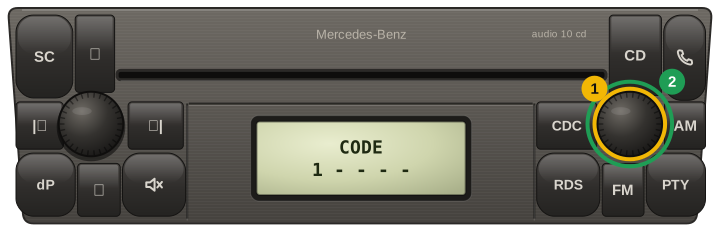
Mercedes Audio 10 CD (Becker / Alpine MF2910, MF2199): turn the right-hand knob to each digit and press it to move on, then hold the same knob for about three seconds after the last digit

Careful: most units lock for good after about ten wrong attempts. If a code does not take, stop and email us before trying again.

Other Mercedes-Benz models

Mercedes-Benz A-Class radio code: questions

Where is the serial number on a Mercedes-Benz A-Class radio?

W168 (1997–2004): BE… / R…, label on the casing, next to the BE model number — tell us how many digits the display asks for.

Is the Mercedes-Benz A-Class radio code free?

Yes — while the rule behind it is still being confirmed the code is free, and we ask you to tell us whether it fitted.

How do I enter the radio code in a Mercedes-Benz A-Class?

Switch the radio on — the display asks for CODE. A four-digit code uses any digits, 0 included. Set each digit the way your unit prompts — usually by pressing a preset button repeatedly, or by turning the tuning knob. On units with numbered buttons, a five-digit code is typed directly: button 1 types a 1, button 2 a 2, and so on, so it only uses the digits from 1 up to the buttons that enter it. Audio 30 APS (seven keys under the display): type the five digits with those keys, then press » at the top left, next to ON, to confirm. Until you press it the digits just stay on the display. Sound 10 cassette units (Vito, Sprinter): step each digit with the + key on the left, move to the next one with a short press of M, and after the last digit press and hold M to confirm. Sound 30 CD units: set each digit with the arrow keys ▲ ▼, move to the next one with a short press of M, and after the last digit press and hold M until the radio takes the code. A short press there only jumps back to the first digit. Audio 10 CD (two knobs): turn the right-hand knob to each digit, press it to move on, and after the last digit hold it for about three seconds. Becker cassette units of 1994–1999 with six preset keys under the display (BE 1692 and its kin): type the five digits with presets 1–6, one press per digit, then press and hold SC between the TUNE arrows. If the display shows WAIT, leave the radio switched on until CODE comes back — 10 minutes, or up to 24 hours after several wrong tries — and do not try another code meanwhile. Some units start by themselves after the last digit; others need a confirm key. If nothing happens after the last digit, tell us what the display shows rather than pressing other buttons. If the screen says Anti-Theft Protection Activated, no code will unlock it — it needs a Mercedes workshop.

Our Reviews

3
Verified unlocks confirmed by owners

Every card here is a code an owner told us worked, tied to an order we can check. Codes that did not work are not shown here, and a fee paid to skip the wait comes back automatically.

Read them all

Mercedes-Benz✓ Verified unlock

Code confirmed by the owner

28 October 2026

Mercedes-Benz✓ Verified unlock

Code confirmed by the owner

22 October 2026

Mercedes-Benz✓ Verified unlock

Code confirmed by the owner

21 October 2026