Free Seat Leon Radio Code

Every Seat Leon from 1999 to 2012: which radio was fitted, where its serial number hides, and what we can do with it.

Your code comes from the serial number of the radio, not from the car — so the first job is getting that number off the unit. The table below is your Leon: the units fitted, and where the serial hides on each.

Already have the serial? Type it in and we will tell you straight away whether we can answer it.

All Seat radio codes →

Free*
That does not look like a Seat serial — check the table below for where to find it.
We never ask for the code you are missing — only the serial.

Which radio is in your Leon?

GenerationRadios fittedSerial Where to read itWhat we do
1M-1P
1999–2012
Aura, Adagio, Alana, Media System SEZ… label on the top or side of the unit In our database: free in 24 h, or instant

Radio names are what is written on the fascia, not the name of the company that built the unit — a “6000 CD” or an “RCD 300” is what you see in the car. Unit fitment varies by market and trim, so treat the list as the usual case and let the serial decide: it is the serial that determines the code, not the model.

About “in our database”. For these units the code is not calculated from the serial — there is no formula, the code lives in the radio's own memory. Every service that answers by serial, ours included, is reading a collected database. Most serials are in ours; when yours is not, we say so on the spot rather than guess at four digits — and there is nothing to pay for a code we do not have.

Seat Leon radio code by year

From 1999 to 2012 the Leon came with the radios below; the serial on the unit is what decides the code.

Seat Leon 1M-1P radio code (1999–2012)

On Leon cars from 1999–2012 the radio fitted was usually one of: Aura, Adagio, Alana, Media System. The serial reads SEZ…; label on the top or side of the unit. We look that serial up in our database; most are there, and if yours is not, the page says so before you leave any details — there is nothing to pay for a code we do not have.

How to enter the code in your Leon

  1. Switch on the ignition and the radio. Most units show SAFE, then 1000 by themselves after a few seconds.
  2. Older units that stay on SAFE (Gamma and Beta with separate TP and TA keys, Audi Concert, Chorus, Symphony): hold the pair of keys printed for it — TP + TA, FM1 + AM, AS + RDS — until 1000 appears, then let go and don’t press the pair again yet.
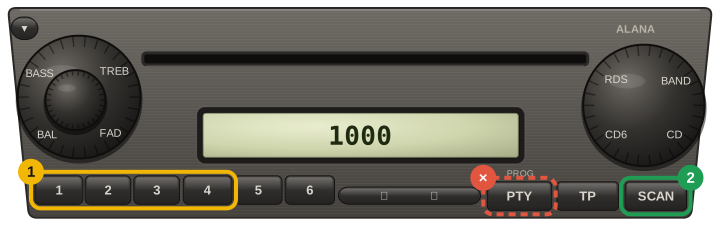
  3. Presets 1–4 each set one digit: press button 1 until the first digit is right, then 2, 3 and 4.
  4. To confirm: older units with the key pair — hold the same pair until SAFE shows again; red-lit Gamma / Beta (Golf IV era) — hold the cassette key or the seek key for more than 2 seconds; RCD 210 / 310 — the button under OK on the display; RCD 300 — the button beside ENTER; Seat Aura — hold PTY until it beeps; Seat Alana — hold SCAN until it beeps; Škoda Swing — press key 6; Škoda Blues — hold key 6.
  5. Touchscreens (RCD 510, RNS 315 / 510, Bolero): type the code on the keypad and tap the confirm field.
  6. You get two tries, then the unit locks for about an hour: keep the ignition and the radio on for the whole hour.
  7. SAFE in the car the radio came from, after a battery change, means it has lost its link to the instrument cluster — tell us before entering anything.
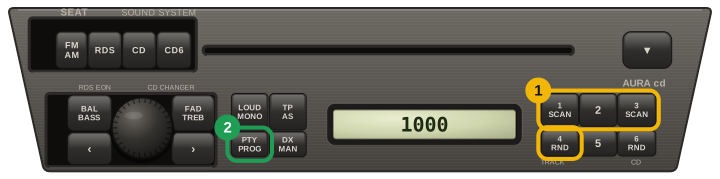
Seat Aura CD: SAFE then 1000, presets 1 to 4 set the digits (press to count up, hold to count down), then press PTY/PROG until it beeps and SAFE flashes up; on the Aura it is PTY/PROG, not SCAN
Seat Alana: SAFE then 1000, presets 1 to 4 set the digits (press to count up, hold to count down), then hold SCAN until it beeps and SAFE flashes up; PTY is the PROG key used to switch the code on or off, not to confirm after a power loss

Careful: most units lock for good after about ten wrong attempts. If a code does not take, stop and email us before trying again.

Other Seat models

Seat Leon radio code: questions

Where is the serial number on a Seat Leon radio?

1M-1P (1999–2012): SEZ…, label on the top or side of the unit.

Is the Seat Leon radio code free?

Yes, if your serial is in our database — the page tells you before you leave any details, and a code we do not have costs nothing.

How do I enter the radio code in a Seat Leon?

Switch on the ignition and the radio. Most units show SAFE, then 1000 by themselves after a few seconds. Older units that stay on SAFE (Gamma and Beta with separate TP and TA keys, Audi Concert, Chorus, Symphony): hold the pair of keys printed for it — TP + TA, FM1 + AM, AS + RDS — until 1000 appears, then let go and don’t press the pair again yet. Presets 1–4 each set one digit: press button 1 until the first digit is right, then 2, 3 and 4. To confirm: older units with the key pair — hold the same pair until SAFE shows again; red-lit Gamma / Beta (Golf IV era) — hold the cassette key or the seek key for more than 2 seconds; RCD 210 / 310 — the button under OK on the display; RCD 300 — the button beside ENTER; Seat Aura — hold PTY until it beeps; Seat Alana — hold SCAN until it beeps; Škoda Swing — press key 6; Škoda Blues — hold key 6. Touchscreens (RCD 510, RNS 315 / 510, Bolero): type the code on the keypad and tap the confirm field. You get two tries, then the unit locks for about an hour: keep the ignition and the radio on for the whole hour. SAFE in the car the radio came from, after a battery change, means it has lost its link to the instrument cluster — tell us before entering anything.