Free Ford Galaxy Radio Code

Every Ford Galaxy from 2006 to 2023: which radio was fitted, where its serial number hides, and what we can do with it.

Your code comes from the serial number of the radio, not from the car — so the first job is getting that number off the unit. The table below is your Galaxy, generation by generation.

Already have the serial? Type it in and we will tell you straight away whether we can answer it.

All Ford radio codes →

Free*
Only needed for an old C… or L… serial: the same number builds a three-digit code on some units and a four-digit code on others, and only the radio itself knows which. Count the boxes it shows. If you typed an M…, V… or FO… serial, ignore this.
That does not look like a Ford serial — check the table below for where to find it.
We never ask for the code you are missing — only the serial.

Which radio is in your Galaxy?

GenerationRadios fittedSerial Where to read itWhat we do
Mk2 early
2006–2008
6000 CD, Sony, TravelPilot V / BP hold 1+6 for 2 seconds Free in 24 h, or instant if you pay
Mk2
2008–2015
Ford Audio, Sony, SYNC 1 V hold 1+6 for 2 seconds; a Z or A number on the sticker is NOT the serial — the V number the radio shows is In our database: free in 24 h, or instant
Mk3
2015–2023
SYNC 2/3 V hold 1+6 for 2 seconds; a Z or A number on the sticker is NOT the serial — the V number the radio shows is In our database: free in 24 h, or instant

Radio names are what is written on the fascia, not the name of the company that built the unit — a “6000 CD” or an “RCD 300” is what you see in the car. Unit fitment varies by market and trim, so treat the list as the usual case and let the serial decide: it is the serial that determines the code, not the model.

About “in our database”. For these units the code is not calculated from the serial — there is no formula, the code lives in the radio's own memory. Every service that answers by serial, ours included, is reading a collected database. Most serials are in ours; when yours is not, we say so on the spot rather than guess at four digits — and there is nothing to pay for a code we do not have.

Ford Galaxy radio code by year

From 2006 to 2023 the Galaxy came in 3 generations, and the factory radio — and with it the serial you need — changed along the way. Find your year below.

Ford Galaxy Mk2 early radio code (2006–2008)

If your Galaxy is from 2006–2008, it is the Mk2 early. The radio fitted was usually one of: 6000 CD, Sony, TravelPilot. The serial reads V / BP; hold 1+6 for 2 seconds. Send us that serial: the code is free by email within 24 hours, or on the page straight away if you pay to skip the wait.

Ford Galaxy Mk2 radio code (2008–2015)

If your Galaxy is from 2008–2015, it is the Mk2. The radio fitted was usually one of: Ford Audio, Sony, SYNC 1. The serial reads V; hold 1+6 for 2 seconds; a Z or A number on the sticker is NOT the serial — the V number the radio shows is. We look that serial up in our database; most are there, and if yours is not, the page says so before you leave any details — there is nothing to pay for a code we do not have.

Ford Galaxy Mk3 radio code (2015–2023)

If your Galaxy is from 2015–2023, it is the Mk3. The radio fitted was usually one of: SYNC 2/3. The serial reads V; hold 1+6 for 2 seconds; a Z or A number on the sticker is NOT the serial — the V number the radio shows is. We look that serial up in our database; most are there, and if yours is not, the page says so before you leave any details — there is nothing to pay for a code we do not have.

How to enter the code in your Galaxy

  1. Turn the radio on — it asks for the code.
  2. First-generation 6000 CD, Sony CD of 2005–2006, 4500, 5000 and 4000 RDS (round presets 1–6, no 7–9 keys): press button 1 until the first digit is right, then 2, 3 and 4. Past 9 it rolls back to 0. Then press and hold button 5 to confirm.
  3. 1500 RDS: set the digits the same way, then confirm with AM/FM instead of 5.
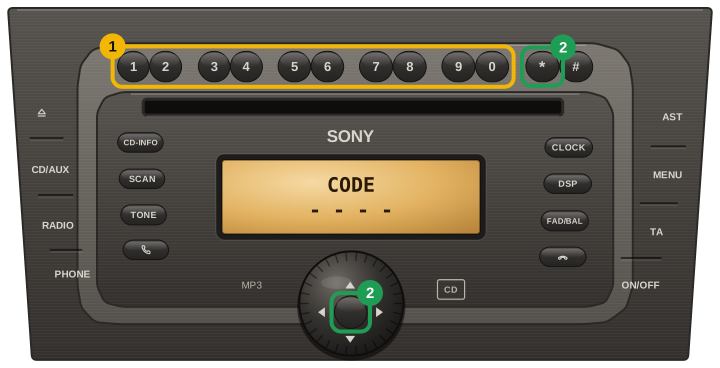
  4. Keypad units (Sony from 2007, and the 2008+ red-display 6000 CD with a 0–9 block): just type the code — the cursor moves on by itself. Confirm with the * key or the centre button between the arrow keys.
  5. If button 5 changes a digit instead of confirming, your radio is the keypad kind: confirm with * or the centre button, held for about two seconds.
  6. TravelPilot DX/EX: turn the ENTER knob to each digit and press it; after the fourth, select the return-arrow symbol and press ENTER.
  7. After a wrong code the radio shows WAIT: leave the radio and ignition on until CODE returns — switching off restarts the wait. LOCKED means no tries are left.
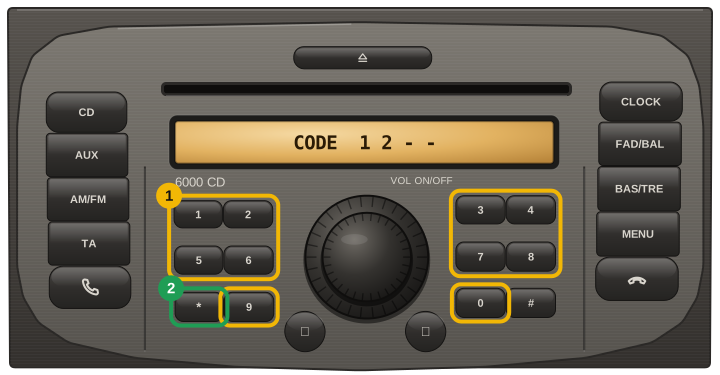
Ford 6000 CD with a 0-9 keypad and red display (2007/2008 on): type the four digits on the keypad, then press the star key to confirm
Ford Sony CD / Sony DAB (keypad version, 2007 on): type the four digits on the 0-9 keys, then confirm with the star key or the centre button of the arrow pad

Careful: most units lock for good after about ten wrong attempts. If a code does not take, stop and email us before trying again.

Other Ford models

Ford Galaxy radio code: questions

Where is the serial number on a Ford Galaxy radio?

Mk2 early (2006–2008): V / BP, hold 1+6 for 2 seconds. Mk2 (2008–2015): V, hold 1+6 for 2 seconds; a Z or A number on the sticker is NOT the serial — the V number the radio shows is. Mk3 (2015–2023): V, hold 1+6 for 2 seconds; a Z or A number on the sticker is NOT the serial — the V number the radio shows is.

Is the Ford Galaxy radio code free?

Yes. Every code we can answer is free and emailed 24 hours after you order; a small fee only skips the wait.

How do I enter the radio code in a Ford Galaxy?

Turn the radio on — it asks for the code. First-generation 6000 CD, Sony CD of 2005–2006, 4500, 5000 and 4000 RDS (round presets 1–6, no 7–9 keys): press button 1 until the first digit is right, then 2, 3 and 4. Past 9 it rolls back to 0. Then press and hold button 5 to confirm. 1500 RDS: set the digits the same way, then confirm with AM/FM instead of 5. Keypad units (Sony from 2007, and the 2008+ red-display 6000 CD with a 0–9 block): just type the code — the cursor moves on by itself. Confirm with the * key or the centre button between the arrow keys. If button 5 changes a digit instead of confirming, your radio is the keypad kind: confirm with * or the centre button, held for about two seconds. TravelPilot DX/EX: turn the ENTER knob to each digit and press it; after the fourth, select the return-arrow symbol and press ENTER. After a wrong code the radio shows WAIT: leave the radio and ignition on until CODE returns — switching off restarts the wait. LOCKED means no tries are left.

Our Reviews

64
Verified unlocks confirmed by owners

Every card here is a code an owner told us worked, tied to an order we can check. Codes that did not work are not shown here, and a fee paid to skip the wait comes back automatically.

Read them all

Ford Trasit✓ Verified unlock

★★★★★

Radio unlocked, Thank You Briliant

X
21 October 2026

Ford Focus 2011✓ Verified unlock

★★★★★

Changing the battery, the radio stopped to work. Thank you to help me unlocking my stereo!

Ford owner
9 October 2026

Ford kuga 2012✓ Verified unlock

★★★★★

Ho cambiato la batteria quindi dovevo rimette il codice e non me lo ricordavo invece con loro in 24-48 lo ripresi

Gabriele
9 October 2026

Ford✓ Verified unlock

Code confirmed by the owner

31 October 2026